
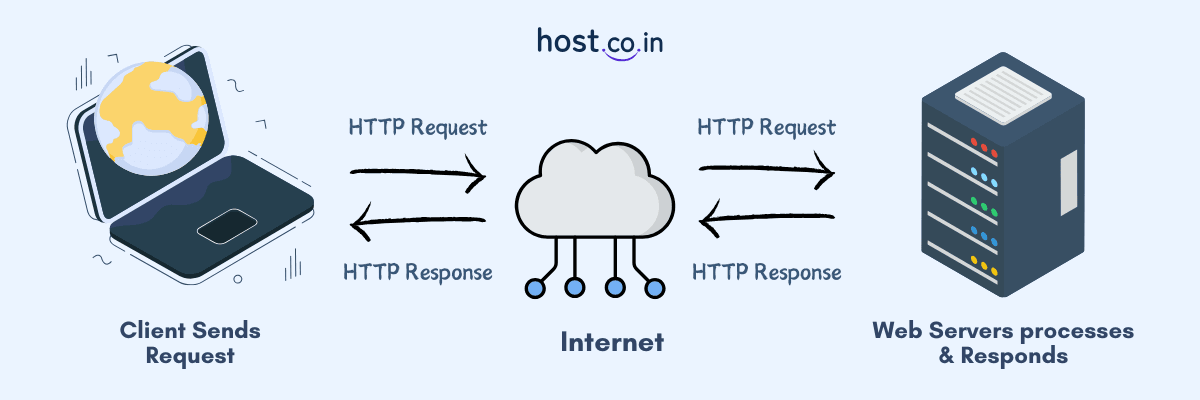
It feels great when you receive a seamless browsing experience and everything online just works; you click a link and the page loads within seconds, or you want to check your bank balance or book a cab online, and everything happens in a flash of seconds, thanks to a fast and reliable web server working behind the scenes. Doesn’t it all seem easy? But there is always a connection between web clients, web servers, and web hosting that keeps the internet running.
This blog talks about the different roles of web clients and web servers, how they talk to each other, and some real-world examples of how they can be used. We’ll also take you through web server and web client differences together with insights into their future trends and operational complexities.
In light of this, let’s break down what a web server and a client are.
Web Server and Web Clients Explained in Simple Terms
- Web server processes customer requests and promptly delivers the web content to them. You can use it to host websites and apps and run backend processes.
- The web client sends requests and displays the web content to the user. For example, browsers or apps. You can use them to access and communicate with web content.
Understanding the Concept of a Web Server
Web servers are the driving force behind the content delivery. It is this crucial component that is responsible for handling and responding to client requests. It stores, processes and delivers web content like pages, graphics, files, and other content through HTTP/HTTPS protocols.
Without web servers, users are unable to access websites and web applications.
Whether you’re a complete amateur, just starting your online journey, or an experienced professional, it is important to know about the constituents of the internet, such as application servers, network infrastructure, etc. Read our thorough guide on web server vs application server: differences, examples & list to know more.
Working of a Web Server
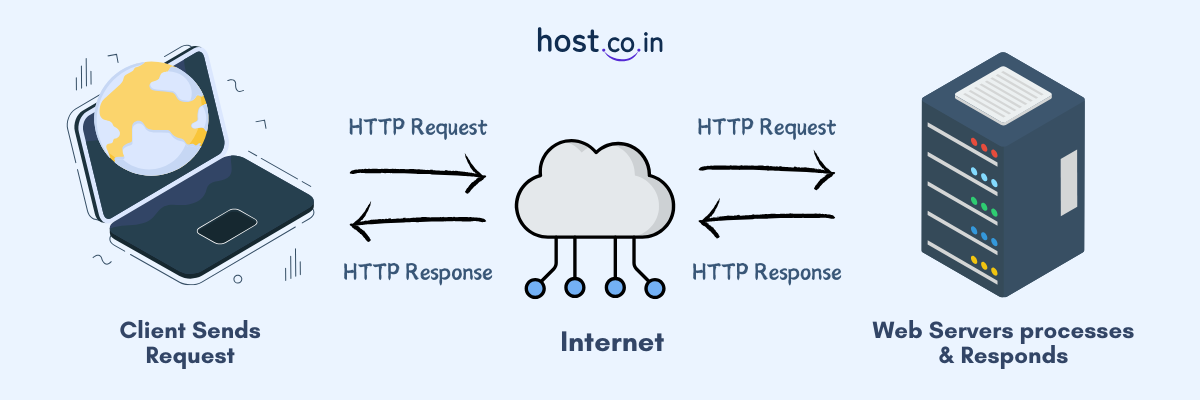
- Request: It all starts when a user or customer interacts with a server by entering a website URL into their browser.
- Processing: The web server gets this HTTP request and then processes it and analyses it and finds out what type of content the user wants to access, including a webpage, a file, or any other kind of web content.
- Response: The web server sends back the requested data in the form of HTML, CSS, JavaScript, and other languages, which can be viewed in a user’s browser. It is important to consider web server response time.
The request-response cycle takes only a few milliseconds to finish, and it happens again and again when a user goes to a new page or asks for other web content, like images or forms.
Important Functions of a Web Server
- Manage HTTP Requests: A web server processes the HTTP requests made by web clients (like browsers) and sends back the appropriate responses. For example, assume that you enter a URL in your web browser, e.g. www.host.co.in, it sends the HTTP request to the web server. The web server then processes that request and quickly sends the requested page back to your browser.
- Deliver Static Content: A web server delivers the requested web content in the form of HTML, CSS, and JavaScript files, images, and videos to web clients directly. It is mainly the foundation of the majority of websites, which often consists of static elements, including logo design, background images, and style sheets.
- Create Dynamic Content: Some web pages need to show dynamic content, such as personalised content, live updates, or customised suggestions. In these cases, the web servers collaborate with application servers and databases in order to retrieve and deliver this type of content instantly.
- Improve Security: Web servers prioritise security, and for protecting your data, they primarily make use of SSL/TLS encryption to encrypt data during transmission and implement authentication and authorisation processes.
- Load Balancing: High-traffic websites mostly depend on multiple servers to effectively manage user requests. In this case a load balancer directs incoming traffic across these web servers, offering faster performance, better uptime, and minimum downtime.
Top Web Server Softwares
A variety of web server software platforms are available in the market, each known for its own strengths:
- Apache HTTP Server – It is one of the most widely used open-source web servers.
- Nginx – It is recognised for its capability to manage multiple connections simultaneously; that’s why it is used by a number of high-traffic websites.
- Microsoft IIS (Internet Information Services) – It includes Windows Server to easily manage everything.
- Tomcat – Built for Java-based applications.
- Web Clients – It connects users to the internet. It is a tool mostly used for interpreting and presenting web pages, moving between them, and smoothly running dynamic content.Want to know more? Check out different types of web servers in our guide.
Understanding the Concept of a Web Client
A web client is basically a program or device that communicates with a web server to request website data, services, or other web resources. It interacts with the web servers on the user’s behalf by using the protocols such as HTTP or HTTPS. Web browsers like Google Chrome, Mozilla Firefox, or Safari are some of the most commonly used examples of web clients users depend on to access websites.
Mobile apps, IoT devices, or some command-line tools such as curl that interact with APIs are some other examples of web clients. In short, if a tool is capable of sending requests to a web server and waits for the answer can be defined as a web client.
Important Functions of a Web Client
- Send HTTP Requests: A web client connects with a web server through HTTP requests to load web pages, images, and other web content.
- Present Web Content: Once a web client receives a response back from the web server, the client shows HTML, CSS, and JavaScript components in order to create a captivating and responsive user experience.
- Run Browser-Side Scripts: Modern web applications are heavily dependent on JavaScript and popular frameworks, such as React, Angular, and Vue.js runs in your browser, which makes websites respond instantly to your actions.
- Manage User Sessions: Web clients store cookies, cache data, and user authentication tokens to keep users logged in and remember their personalised settings.
- Secure Online Transactions: Web clients maintain online security by verifying website security using SSL certificates, HTTPS, and implements protective measures against phishing attacks, malware, and data breaches to provide a safer browsing experience.
Top Web Client Softwares
- Web Browsers – Google Chrome, Mozilla Firefox, Microsoft Edge, Safari.
- Mobile Applications – Applications that connect to web services using APIs.
- REST API Clients – People often use apps like Postman and Insomnia to test and fix web APIs.
- Command-Line Tools – HTTP requests can be sent directly using Curl and Wget command-line tools.
Web Client and Web Server: Side-by-Side Comparison
| Features | Web Server | Web Client |
| Primary Function | Respond to incoming requests | Send requests |
| User | Developers, web hosts | End users |
| Examples | Apache, Nginx, Microsoft IIS | Chrome, Firefox, Mobile Apps |
| Function | Saves, processes, and provides content to user | Presents and allows online interaction |
| Connection | Awaits for clients requests | Starts communication |
| Data Processing | Permanent storage for website data | Provides temporary storage like cache and cookies |
| Security Function | Manages SSL encryption and filters data | Checks SSL certificate and alerts users |
| Execution Style | Server-side processing | Browser-based rendering and scripting |
Examples of Web Client and Web Server Communication
The following examples will help you better understand what is web server and web client, and how it works in real-world applications.
1. Browsers and Websites
When you buy something on Flipkart, Myntra, or eBay, your browser, i.e., web client asks for pages with products on them. The application server on the website gets the data from a database server and then shows it to you.
Why it’s client-server: Multiple servers (web and database) work together to handle client requests.
It shows exactly how a web client and server work together.
2. Mobile Apps and Servers in the Back End
When you check your balance or move money through a bank’s mobile app, for example, your phone (the client) talks to the bank’s backend servers to make sure the transactions go through.
Why it’s client-server: The server does safe tasks and sends answers back to the client.
Apps on mobile devices are also clients; they don’t work alone, they do talk to servers in real time every time you do something in it.
3. Cloud-Based Storage
For example, when you put a file on Google Drive or Dropbox, your device acts as the client that sends the file to the server in the cloud. The server then protects the data and makes it available later.
The client-server model is used because the client needs the remote server to store and get data.
4. Online Gaming
In multiplayer games like Fortnite, for example, your game client talks to a game server that keeps track of where players are, what they’re doing, and their scores in real time.
It’s a client-server system because the web server keeps track of the game’s state, and clients send and receive updates.
It is a great example of client-server communication that needs to be fast and reliable.
Web Client and Web Server Challenges
Problems with Web Servers
- Problems with scalability during busy times.
- DDoS attacks, SQL injection, and cross-site scripting.
- Server downtime affects user experience.
Web Client Challenges
- Problems with compatibility across different browsers.
- Reduced performance due to non-optimised code.
- Security vulnerabilities due to use of outdated software.
The Future of Web Clients and Web Servers
The following are some of the latest trends of web servers and web clients.
- Edge Computing
- AI-Driven Web Servers
- PWAS (Progressive Web Applications)
- HTTP/3 and QUIC Transport Protocol
Client OS vs Server OS: Everything You Want to Know
In spite of the fact that web clients and servers can operate on any operating system, still there are a few major differences between them:
| Features | Client Operating System | Server Operating System |
| Purpose | Developed for easy-to-use interface and daily tasks | Developed to deliver stability, reliable performance, and multiple users |
| Examples | Windows 10, macOS, Ubuntu | Windows, Ubuntu, Red Hat Enterprise Linux |
| Customer Base | Single user | Multiple users |
| Services | Focus on user-friendly design, media features, and task management | File sharing, hosting websites, and managing network systems |
| Safety | Fundamental security measures | Advanced security measures |
Conclusion
Web clients and web servers have different but connected roles in the digital world. Where Web servers manage HTTP requests and send content back to the users. On the other hand, web clients receive this information, understand it, and show it to users. With the help of these together, businesses and developers make web platforms that are powerful, scalable, and safe.
Continue exploring the world of the internet and check out our related blogs on web servers and application servers because the internet has lots more to explore!